Services and service map
Use Services to see what has sent telemetry into a project. Use Service Map to inspect rolled-up dependencies between services.
Service catalog
Section titled “Service catalog”Open Services to see catalog entries created from service.name. Oriel creates a
service catalog row on first ingest for each project and service name.
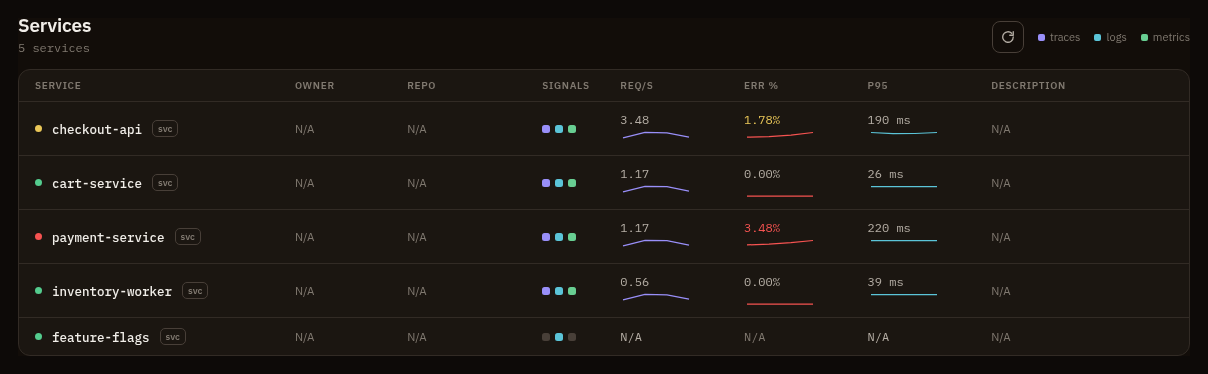
Service catalog fields include:
- Service name
- Owner
- Repository URL
- Description
- Signal presence derived from telemetry
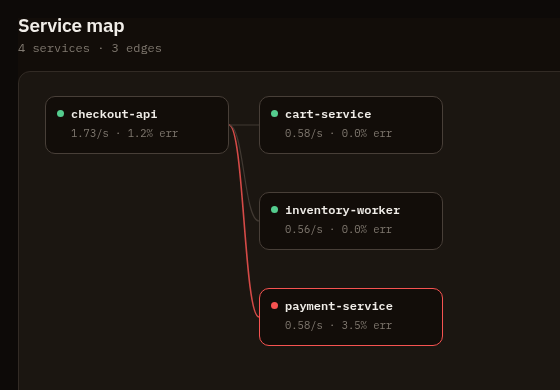
Open Service Map to inspect rolled-up service edges. The worker role evaluates service-map rollups on a fixed cadence and backfills recent completed hours.
Permissions
Section titled “Permissions”Reading services requires projects:read and telemetry views require
telemetry:query. Editing service catalog metadata requires services:manage.
Pivots
Section titled “Pivots”- From a service row, open traces or logs scoped to that service.
- From a service-map edge, inspect calls, errors, and p95 latency.
- Use missing signal presence to find instrumentation gaps.
- Add owner and repo metadata to make incident triage faster.