Feature flags
Use Oriel feature flags to control runtime behavior per project and environment, with reusable segments, prerequisite flags, percentage rollouts, and SDK evaluation endpoints.
Define a flag
Section titled “Define a flag”Feature flag definitions are project-scoped. A flag has a stable SDK key, a
value type, at least two variations, optional tags, and optional archive state.
Boolean flags default to true and false variations when variations are not
provided.

Targeting is environment-scoped. Open a flag, choose an environment, and edit:
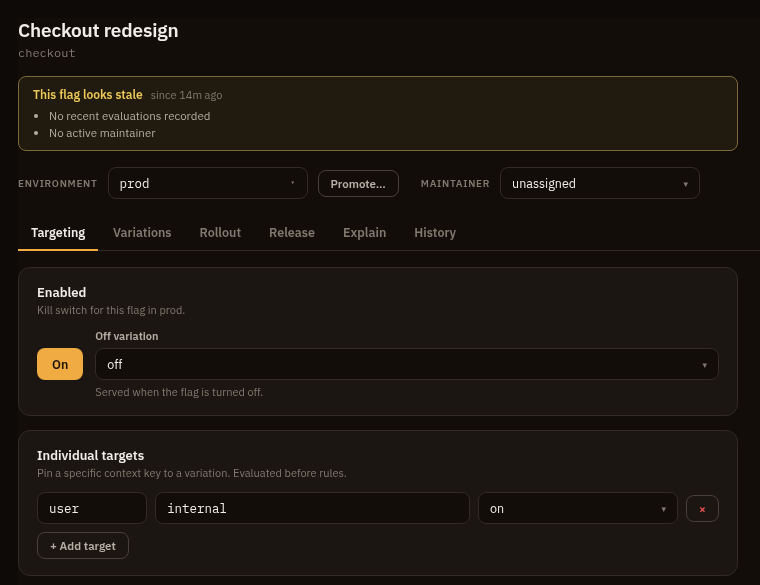
| Setting | Purpose |
|---|---|
| Enabled | Kill switch for that flag in that environment. |
| Off variation | Value served when the flag is disabled or a prerequisite fails. |
| Individual targets | Pin one context kind and key to a variation. |
| Rules | Ordered targeting rules; first matching rule wins. |
| Fallthrough | Value or rollout served when no target or rule matches. |
| Prerequisites | Other flags that must serve a required variation first. |
A flag with no environment settings row is disabled. The implicit off variation
is the last variation, which makes a default boolean flag serve false while
off.
Evaluation
Section titled “Evaluation”SDK evaluation follows this precedence:
- Return an
ERRORreason for malformed flag definitions or missing flags. - If disabled, serve the off variation with reason
OFF. - Evaluate prerequisites. Any missing, disabled, errored, or non-matching
prerequisite serves the off variation with reason
PREREQUISITE_FAILED. - Check individual targets.
- Check ordered rules.
- Serve the fallthrough.
Archived flags are excluded from SDK snapshots and bulk evaluation.
Targeting
Section titled “Targeting”SDK contexts contain a kind, a key, and attributes:
{ "context": { "kind": "user", "key": "u-123", "attributes": { "email": "ada@example.com", "plan": "enterprise", "version": "1.8.0" } }}The special key attribute matches the context key. Supported rule operators
are in, not_in, eq, neq, contains, not_contains, starts_with,
ends_with, matches, not_matches, gt, gte, lt, lte, semver_eq,
semver_gt, semver_lt, before, after, and in_segment.
Segments are reusable project-scoped audiences. An explicit segment exclusion wins over an inclusion, an inclusion wins over rules, and segment rules use the same clause operators as flag rules.
Percentage rollouts are sticky. Weights must sum to 100%, and bucket_by
defaults to the context key.
SDK keys
Section titled “SDK keys”Create SDK keys in project settings under Flag keys. A key is pinned to one
project and one environment, and the secret is shown once. Use flags:manage to
mint keys. Listing key records uses tokens:read; revoking them uses
tokens:manage.
SDK requests authenticate with:
Authorization: Bearer orl_...| Endpoint | Purpose |
|---|---|
POST /api/v1/sdk/flags/evaluate/{key} |
Evaluate one flag. |
POST /api/v1/sdk/flags/evaluate |
Evaluate all non-archived flags for a context. |
GET /api/v1/sdk/flags/ruleset |
Fetch the client-side ruleset; supports ETag. |
GET /api/v1/sdk/flags/stream |
Server-Sent Events stream of ruleset put events. |
Telemetry
Section titled “Telemetry”Oriel emits feature flag telemetry on a best-effort path when the API and ingest
pipeline run together, such as oriel serve --role=all.
| Signal | Name | Notes |
|---|---|---|
| Metric | feature_flag.evaluations |
Delta count grouped by flag key, variation, evaluation reason, and provider. |
| Log | feature_flag.change |
Environment-scoped targeting changes. Definition-only changes have no environment and are not emitted as logs. |
| Exposure | flag_exposures |
Per-unit assignment for tracked rollouts, written to a dedicated ClickHouse table for experiment analysis. Captured only for tracked-rollout evaluations with a resolvable unit. |
Flag telemetry lands in the same project and environment as the evaluated flag. It uses the project retention settings for logs and metrics.
Split observability by served variation
Section titled “Split observability by served variation”The feature_flag.evaluations metric already carries the served variation under
the feature_flag.variant attribute (the variation index) alongside
feature_flag.key, so OQL splits it directly:
metrics | where name == "feature_flag.evaluations" and feature_flag.key == "checkout" | stats sum(value) by feature_flag.variantTo split your own application telemetry the same way, stamp the served variation
onto the spans and logs your app emits. The evaluation response returns the
served variation_index; set it on a span or log attribute named
feature_flag.variant, following the OpenTelemetry feature-flag semantic
convention:
span.set_attribute("feature_flag.key", "checkout")span.set_attribute("feature_flag.variant", str(result.variation_index))Once present, any OQL query groups by it, so an error-rate or latency query reads per variation with no schema change:
spans | where feature_flag.key == "checkout" | stats count_if(status_code == "error") as errors, count() as total by feature_flag.variantThis is the read side a guarded release depends on. Its guardrail metrics split treatment against control by the same attribute. Carrying a stable unit id (the same one the rollout buckets by) on that telemetry lets a guardrail join each unit’s exposure to its outcome; without it the guardrail still reads aggregate rates but cannot run the per-unit treatment-versus-control test.
Stale flag detection
Section titled “Stale flag detection”The worker assesses each flag for staleness on the [flags] scan_interval and
surfaces a badge on the flags list and a banner on the flag page. A flag is
flagged when any of these hold:
| Reason | Condition |
|---|---|
temporary_aged |
A temporary flag idle longer than [flags] stale_after. |
settled |
Enabled and serving a single variation in every configured environment, with no rules or targets. A cleanup candidate. |
unused |
At or below [flags] unused_threshold evaluations over [flags] unused_window. |
orphaned |
No maintainer, or a maintainer who left the workspace. |
Detection is advisory and never archives or deletes a flag. The unused signal
depends on evaluation telemetry; it is gated by [flags] unused_detection so
deployments that do not emit flag evaluations can turn it off.
Rollout analytics
Section titled “Rollout analytics”Open a flag, choose an environment, and select Rollout to see how a
percentage rollout behaves, computed from feature_flag.evaluations:
- the variation split over time,
- the evaluation-reason breakdown,
- configured weights against the observed split, with a drift flag.
The expected-against-actual comparison applies to a fallthrough rollout and requires a minimum of a thousand fallthrough evaluations before it reports drift.
Experiments
Section titled “Experiments”An experiment pairs a flag’s tracked rollout in one environment with goal metrics and reports per-variation statistics. Variations and weights come from the flag.
- Create a draft over a flag, pick the control variation and the randomization unit, and define one or more goal metrics with exactly one marked primary.
- Each goal metric reads spans, logs, or metrics through an OQL predicate and joins to exposures by a unit attribute that the outcome telemetry carries.
- Start the experiment to snapshot the rollout arms. The worker recomputes results each tick.
Results report exposures, conversion rate or mean, relative lift with a 95% confidence interval, significance (Bayesian probability to beat control, or a frequentist p-value), and a sample-ratio-mismatch check that flags a split that does not match the configured weights.
Analysis needs a shared unit id on both sides. The SDK records a per-unit exposure for each tracked-rollout evaluation, and the outcome telemetry must carry the same id under the metric’s unit attribute. Without it, an experiment still reports exposure counts and the mismatch check, but no goal results.
Permissions
Section titled “Permissions”| Permission | Allows |
|---|---|
flags:read |
List flags, read segments, read targeting, view change history, and read rollout analytics and staleness. |
flags:write |
Create and edit flags, segments, targeting, and prerequisites. |
flags:manage |
Mint environment-pinned SDK keys. |
tokens:read / tokens:manage |
List and revoke SDK key records. |
experiments:read |
List and read experiments and their results. |
experiments:manage |
Create, edit, start, stop, archive, and apply experiment winners. |