Alerts, silences, and channels
Alerts run OQL on a cadence, turn matching results into alert instances, and deliver those instances through channels and routing policies.
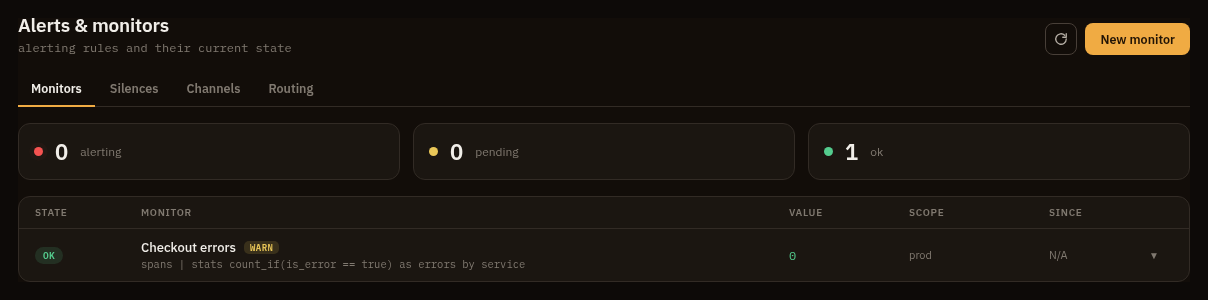
Build an alert rule
Section titled “Build an alert rule”An alert rule contains:
- Name and enabled state
- Scope
- OQL query
- Evaluation window, cadence, and hold duration
- A condition: a threshold, a composite of AND/OR sub-conditions, or an anomaly against a seasonal baseline
- No-data behavior
- Severity:
page,warn, orinfo - Channel list
- Maximum alert instances
Use silences to suppress matching alert instances for a bounded time window. Use channels to deliver notifications to webhook, Slack webhook, Discord webhook, ntfy, or SMTP email targets.
Conditions
Section titled “Conditions”A condition is one of three kinds:
- Threshold compares the rule’s OQL value against an operator (
>,>=,<,<=,==,!=) and a value. The value carries its OQL units, so400msand10 KiBcompare against duration and byte columns. - Composite combines sub-conditions with
andoror. Each sub-condition is its own OQL query, window, operator, and value, and fires when any of its samples meets the comparison. The rule fires when the logic holds across all of them. A composite rule produces a single instance. - Anomaly compares the rule’s latest reading against a learned seasonal
baseline instead of a fixed value. The rule’s OQL is a single scalar series,
which the worker bins at
binoverlookbackof history and folds overseason, so each reading is judged against the same phase of earlier seasons (the same hour of earlier days for a1dseason). It fires when the reading is more thansensitivitystandard deviations from the baseline, on the side set bydirection(above,below, orboth). A phase with too little history does not fire.
A composite is how you page on a combination, for example error rate high and
p95 latency high, each measured over its own query and window. An anomaly is how
you page on a signal leaving its usual daily or weekly shape when no fixed
threshold fits, for example request volume that is normal at noon and alarming at
3am.
Routing policies
Section titled “Routing policies”A routing policy adds channels to a firing alert when its matchers hit, on top of
the rule’s own channels. Policies are workspace-wide, so one policy can send every
page alert to an urgent channel without editing any rule.
Matchers are label/value pairs, and all of them must match. They are checked
against the alert’s labels: the firing instance’s group labels plus the reserved
keys severity, rule, project, environment, and service. A policy with no
matchers routes every alert; a policy with no channels has no effect.
Channels resolve additively: a firing alert delivers to its rule’s channels and to the channels of every matching policy, deduplicated.
Permissions
Section titled “Permissions”| Action | Permission |
|---|---|
| View alert rules and instances | alerts:read |
| Create, update, or delete rules | alerts:manage |
| View or manage routing policies | alerts:read / alerts:manage |
| Create or delete silences | silences:manage |
| View channel names and kinds | channels:read |
| Create, delete, or test channels | channels:manage |
Pivots
Section titled “Pivots”- Open the rule’s OQL in Explore.
- Use alert scope to jump to matching logs, traces, or metrics.
- Route
pageseverity to urgent channels andwarnorinfoto lower-noise destinations. - Use silences during planned deploys or known maintenance windows.